
There are a dozen different SaaS pricing models for you to choose from to fit your business. When finding your approach to pricing saas products it’s more than likely you’ll need to mix and match different pricing models together.
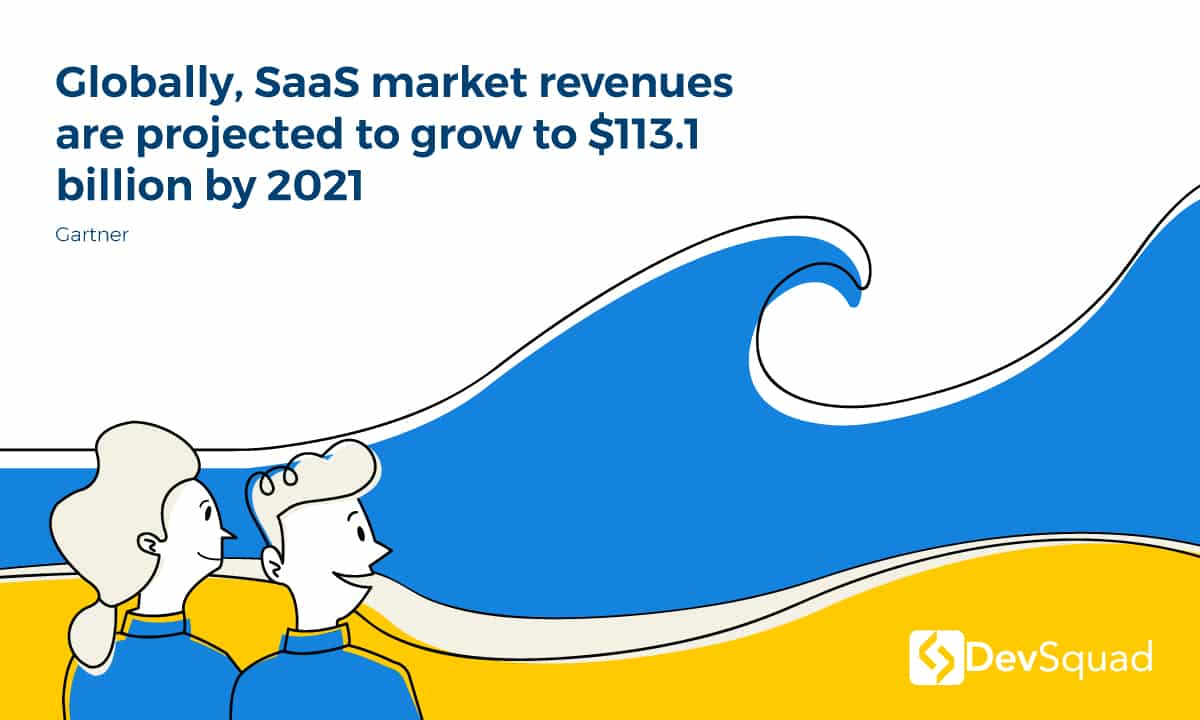
SaaS is cutthroat. 2024 saw a 25.6% increase in startup shutdowns compared to the previous year, and that trend is expected to continue in 2025. While 95% of businesses use SaaS solutions, up to 92% of their SaaS budget goes toward renewals—meaning new customer acquisition is tougher than ever.
The steady integration of APIs and AI into the SaaS atmosphere is also starting to transform the economic landscape of the subscription economy. It is true that subscriptions still dominate—with 65% of SaaS companies still relying on them—but usage-based pricing has established a solid foothold. 25% of SaaS companies with AI offerings are utilizing this approach.
Acquiring new customers is expensive. Customer acquisition cost (CAC) ranges between $200 and $600 for most SaaS businesses, making pricing strategy a critical factor in profitability. Meanwhile, early-stage SaaS startups can see monthly churn rates as high as 10%, while the industry benchmark sits at 2%.
Now just imagine how much trouble you’ll be in if your customer acquisition cost (CAC) comes at the wrong price point.
You’ll be stuck making way less revenue than you should be making, or risk aggravating customers with big price jumps.
The ideal price point and pricing model can actually inspire trust and stickiness with customers, while giving you the runway you need to build a great product better and faster than your competitors.
In other words, the right pricing plan may not change the software product. But it can showcase the product's lifetime value, and ensure a realistically positive profit margin for smart startups.
What is a SaaS pricing model?
A software as a service pricing model is how a software-as-a-service company (SaaS) charges for access to its software features. While many SaaS companies offer both monthly and annual subscriptions, ensuring recurring revenue, there are exceptions. For example, some B2B SaaS companies that cater to enterprises might only offer annual contracts that need to be paid in-full up front in advance of the year. SaaS companies that sell annual contracts of two years or higher experience less churn.
On the other hand, some SaaS companies might not even charge on a monthly or annual basis. For example, MemberVault allows customers to choose to pay a one-time fee for lifetime access.
Then there are also the shifts in customer demand. While traditional subscription-based pricing remains dominant, an increasing number of SaaS companies are moving toward more dynamic pricing strategies. Hybrid pricing models are emerging as a response to customer demand for flexibility, particularly in AI-driven and data-heavy services. By integrating tiered pricing, feature-based pricing, or pay-as-you-go models, companies can tailor their monetization approach to better match customer usage patterns and expectations.
Use metrics for better decision-making
Before you determine which SaaS pricing plan will be optimal for your startup, calculate your customer acquisition cost (CAC). This critical metric is just how much money it takes, on average, to acquire a new customer.
Figure this out by adding up all of your marketing and advertising costs over the course of a year or longer, including expenses for marketing and sales team members that went into new customer acquisition, and divide those by the number of new customers.
Now, compare this to the average lifetime value (LTV) of your customers. A healthy business should see a LTV to CAC ratio of 3 to 1 or higher.
SaaS pricing models versus SaaS billing models
What's the difference between a SaaS pricing model and a SaaS billing model?
Sometimes these terms are used interchangeably, but they are different. A SaaS pricing model is what you charge customers (i.e. SaaS fees) and what they receive in return. A SaaS billing model is how customers pay and when they are charged.
For example, you might use a tiered pricing model with 3 successive tiers, each allowing access to additional features. Your billing model could include a 30-day money-back guarantee on new plans and a requirement to cancel plans with a minimum of 3 days' notice before the next bill date. Your billing model can also refer to the billing software you use such as Recurly or Chargebee.
The strategy for choosing a SaaS pricing model
The right SaaS pricing model will optimize the amount of revenue that you bring into your business while increasing customer loyalty and retention. You don't want to randomly raise your prices or overcharge. You need to bear in mind that customer retention can drive massive improvements in profitability, so your prices need to be reasonable and valid so that customers continue to pay.
The perfect pricing model for your business depends on the different SaaS products your brand offers, the add-ons and feature options available, your target markets, your brand, and market expectations. Many SaaS companies create custom or hybrid models. For example, Hubspot's CRM is free, but other Hubspot tools have various pricing tiers based on users, features, and more.
However, for most SaaS businesses just working to develop pricing models, it's better to stay focused. A company with very simple branding and UX would do themselves a big disservice if they had a complicated pricing page. Below, we explore different pricing models and what types of companies they are best suited for.
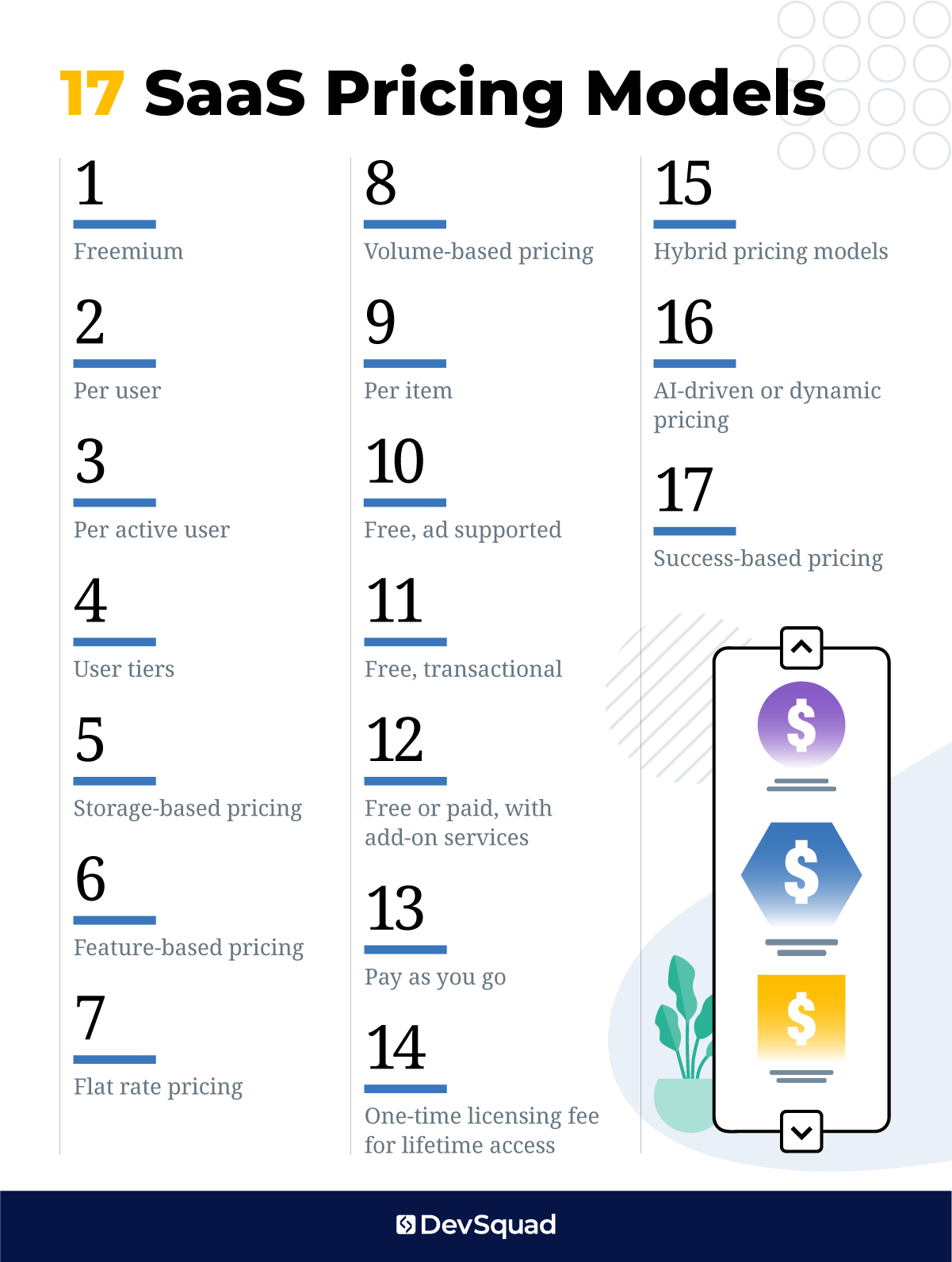
17 SaaS pricing models with examples for each
While these pricing models are unique, they can also be combined.
For example, a SaaS product might have a freemium or low price version, but also subscriptions or premium options that are based on per user and per feature pricing.
Check out these SaaS pricing model examples:
1. Freemium
First, let’s take a look at the most controversial pricing model for SaaS of all time: freemium. Calendly is a great example of this, because their pricing page makes it super easy to see what value you can get from the free plan, and also what isn’t included.

Calendly makes it so that consumers, students, and club organizers all likely fit into their free user buyer persona, and can achieve their scheduling needs with the free version. In contrast, most small business owners will want the integration features and custom branding, so they will pay a higher price to upgrade to a better plan.
When Basecamp came out with Basecamp 3, it created a sort of hybrid freemium model with Basecamp 3 using the flat-rate pricing model and Basecamp 2 sticking around in a very limited version for free users.
Why is freemium pricing so controversial? Many SaaS entrepreneurs and marketers believe that a freemium plan with a free or lower price options is merely a means for onboarding and growing the customer base, and that it doesn’t even count as a pricing model. That may be true, but it is something that goes on your pricing page, and the features that get included (or not) are something that comes up during overall pricing discussions, so we’re including it here.
Best fit for: Offering a freemium version of your SaaS product is the right fit if your SaaS product has a massive addressable market, if that market is mature, and if you give enough value in the free version without giving away so much that businesses who can afford to pay you won’t have to. Essentially, your free version should only be of use to consumers or businesses with no employees on staff.
Not a fit for: Freemium isn’t a fit for SaaS products that are very niche (only address certain verticals or industries), or for products that can only provide value to medium and large businesses.
It’s also typically not a fit for SaaS products that, even if they are aimed at B2B, can’t be used by consumers at all. The most successful SaaS companies with freemium versions all have some B2C use cases (churches, schools, clubs, other organizations), even if that’s not the target customer.
2. Per user
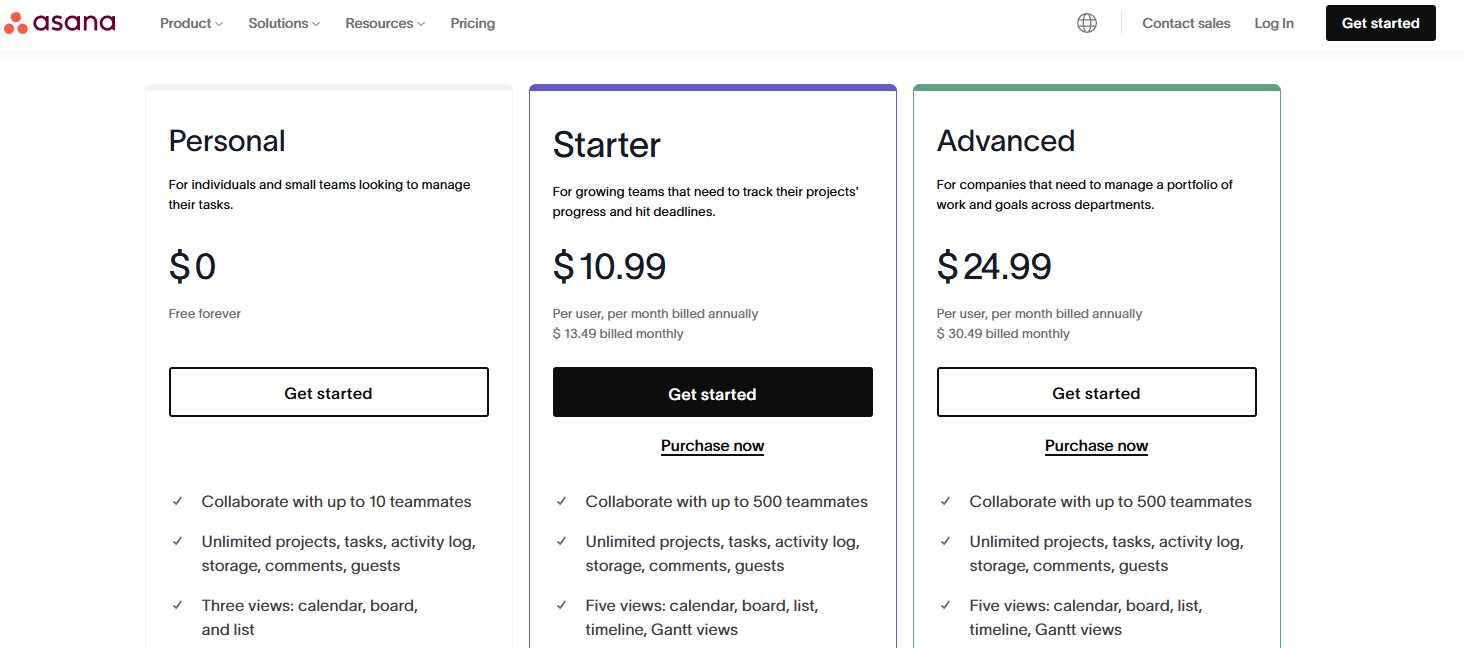
Just like it sounds, with per user saas subscription pricing models, a company charges based on how many users. Asana, a project management tool, follows this model, offering different pricing tiers for what is provided, but on a per user of user format.
Their pricing structure allows buyers to select the plan that best fits their feature needs, and then simply multiply that monthly cost by the number of team members who require access. This makes it easy for businesses to scale their usage while keeping pricing predictable.
Best fit for: This type of SaaS pricing model is best if you can demonstrate the real value of your product that comes with additional users (not just different login credentials). Obviously, it’s also a fit for target customers with employees on staff, not just small business owners and freelancers.
Not a fit for: The per-user pricing model isn’t a fit for any business that doesn’t require different user accounts to get value. For example, an SEO tool doesn’t need different logins, and a company will just purchase one account and then share the password internally. There needs to be a real reason for charging per user, otherwise, you’ll stagnate growth.
If there isn’t a good reason to charge per user, then employ one of these other models instead.
3. Per active user
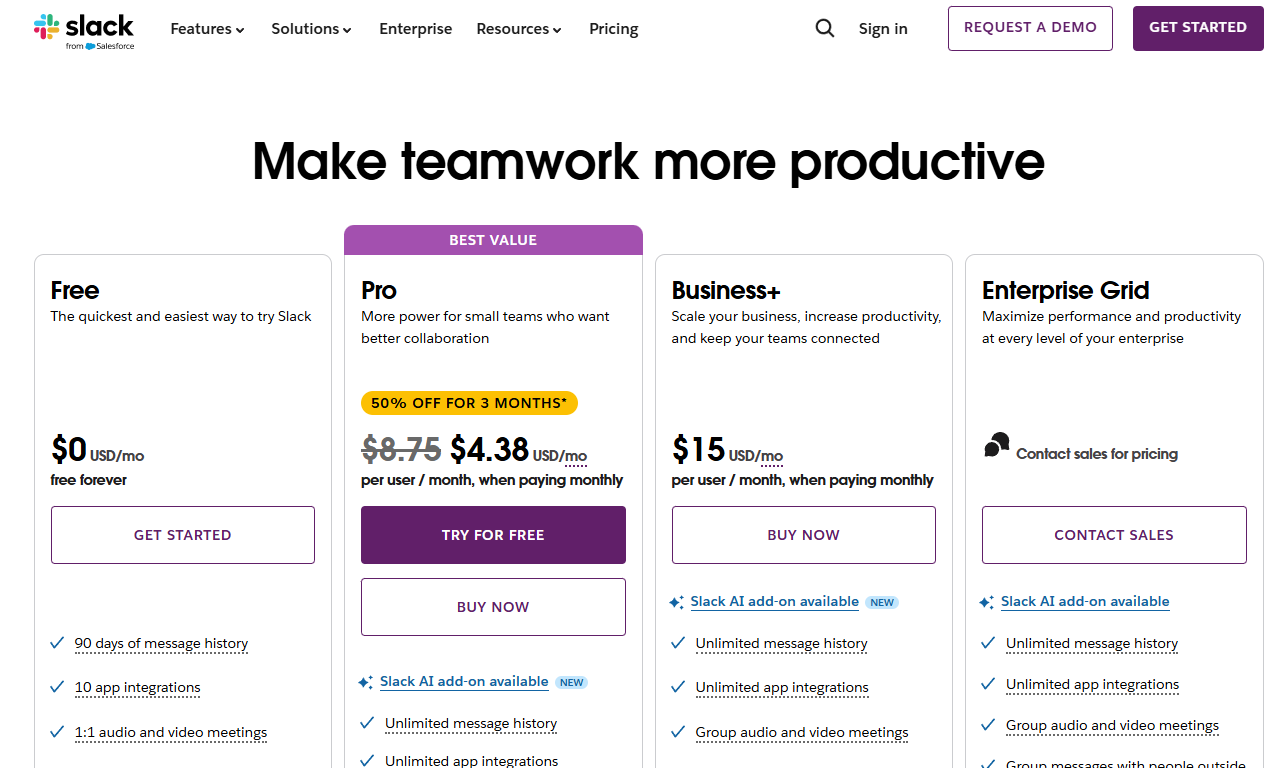
Everyone’s favorite SaaS example, Slack did an interesting thing with their pricing, and put a spin on it. They only charge per active user, whether this person in your organization or is a guest.
What’s great about this is that it removes the barrier from companies who don’t want to pay because of a large number of employees.
Best fit for: This is a great fit for a product that is intended to be used by every employee of a large company, but may not be used regularly.
For example, an employee advocacy platform makes it easy for employees to discover company content to share on social media. The intended use is to get everyone sharing, but not everyone will log in and share things on social, so the company shouldn’t pay for those users.
Not a fit for: This is not a fit for products that still provide value for inactive users. For example, not every product is intended to be used every day or even every month. Expensify measures success based on how infrequently people use their app because that means it’s saving everyone time.
4. User tiers
User tiers used to be a very common pricing structure in SaaS. Instead of charging per user, you charge for blocks of users. Smartsheet combines user tiers with role-based pricing, offering plans that differentiate between licensed users, free viewers, and guests. This allows businesses to scale collaboration efficiently, ensuring that only those who need full editing access pay for a license, while others can view or comment for free.
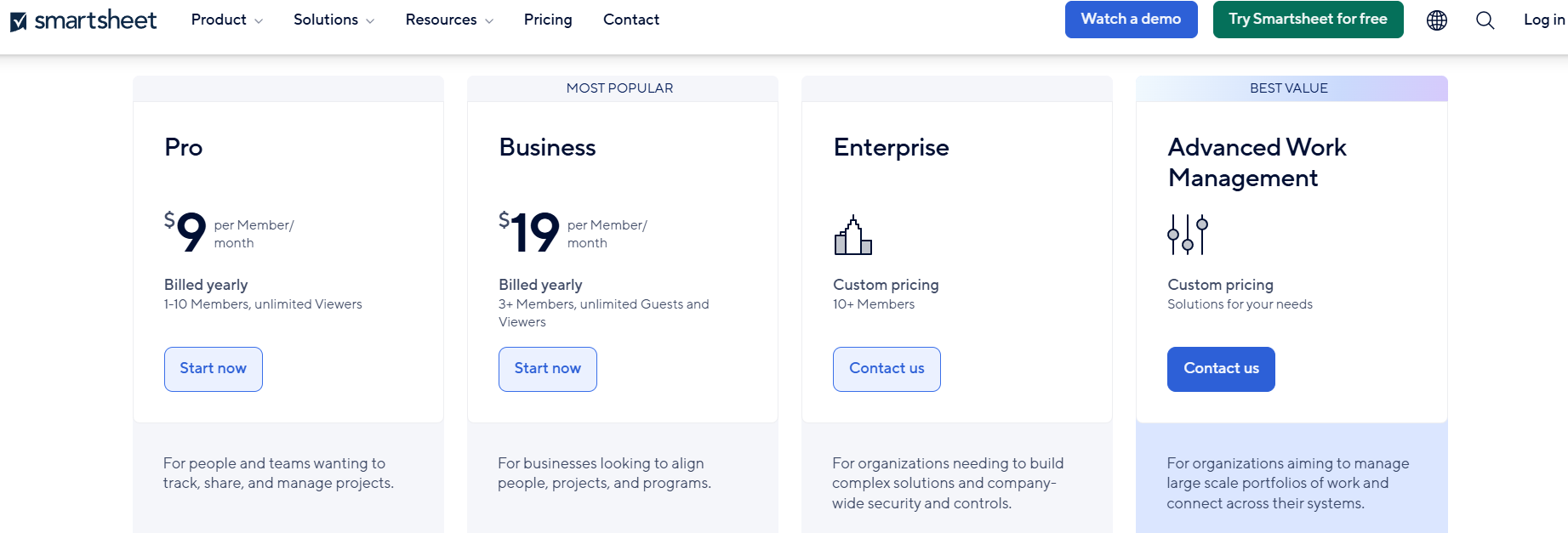
While not as common as it once was, it is still worth noting as the best way to decide on your own approach is to understand all your options.
Best fit for: This is a great fit for a lot of different SaaS companies. When compared with per-user pricing, it makes it a lot easier for potential customers to quickly calculate how much they will be paying each month and the set of features they'll be getting. Also, users can fluctuate some and yet the price will stay the same. Small businesses tend to appreciate the simplicity of user tiers.
Not a fit for: This SaaS subscription pricing model doesn’t work well for products where the user count changes frequently. That’s because businesses would rather pay for the users they have, instead of always feeling like they’re rounding up. Also, enterprises will likely need custom per user pricing anyways.
5. Storage-based pricing
There are endless SaaS examples with storage-based pricing, including digital asset management and cloud storage solutions. But this example comes from cloud storage startup Wasabi, which offers pricing based on the amount of data stored. Unlike traditional providers, Wasabi charges a flat rate per terabyte, eliminating fees for data retrieval or API requests. This makes it a cost-effective alternative for businesses that need predictable, scalable storage pricing without hidden costs.
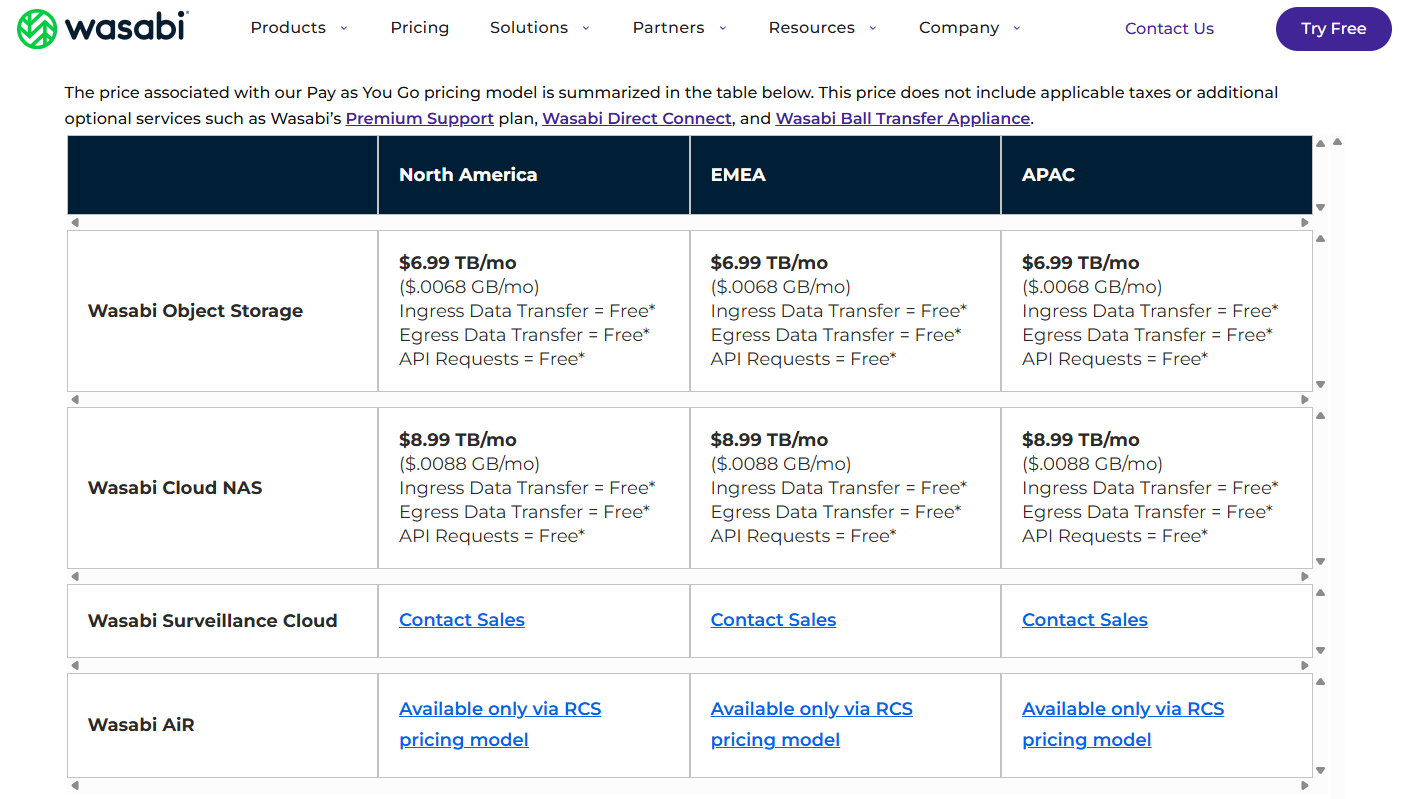
Storage-based pricing is rarely seen as a price differentiator all on its own and is frequently combined with other factors. For example, Dropbox offers storage-based pricing that is billed monthly or annually to generate recurring revenue but also offers a limited free option.
Best fit for: This can be a great fit for companies that serve a variety of company sizes. While it’s not fair to overcharge small businesses, it’s also not fair (to you) to undercharge large companies that are contributing to the size of your AWS bill.
Not a fit for: This isn’t a fit for companies that don’t have some sort of obvious storage component. While as a SaaS entrepreneur, you might understand that the usage of your software translates to hosting and storage, users won’t. There should be some sort of file storage happening, otherwise this won’t make sense to users.
6. Feature-based pricing
One of the most common SaaS pricing models, feature-based means that companies are charging based on the features included in that subscription.
One example is GoSquared, which combines feature-based pricing with volume-based pricing so that users pay for what features in the platform they’re using, and also the number of monthly page views for their website.

Best fit for: If your product has grown to fit needs that not every customer has, this might be the right pricing model. You might need to implement feature-based pricing so that you don’t need to raise prices on customers who don’t even want your new feature set.
Not a fit for: This isn’t a fit for very simple products with not a lot of features to differentiate from. Having two or three options makes people more likely to select one, so if you don’t have features to separate your product, then utilize users, volume, or some other unit.
7. Flat rate pricing
Buffer is well known for its simple flat rate subscriptions. This is slightly different from the other pricing models examples because the price really is flat rate. There are no add-ons for volume or for users. What you see is what you get, and this simplicity has undoubtedly contributed to Buffer’s growth.

Best fit for: This pricing model is the right fit for products that serve small to medium sized businesses. It also works well when the required users and features needed grow in tandem with each other.
Not a fit for: This isn’t a fit when the value of the different features, volume, and users are unrelated. You don’t want to force customers to pay for more volume when all they want is an extra user.
8. Volume-based pricing
Volume-based pricing can apply to all sorts of things, but an easy example is email. YMLP is a popular tool for PR email outreach and other large volume email outreach.
There are two pricing tiers to choose from, and within each one there are different amounts based on the volume of emails, from 500 to 100,000 and beyond.

Best fit for: This is a great fit when volume matters. There’s a huge difference between a business that will send 500 emails a month and one that will send 100,000 emails a month. It’s only fair that they pay for the different value they’re getting.
Not a fit for: This isn’t a fit when the volume doesn’t correlate to the business. For example, a small business owner with 30 purchases a month in their accounting system isn’t necessarily extracting more value from your product than a business owner with 5 purchases a month.
9. Per item
Let’s get creative, shall we? Why not charge per item? In this example from Zipi, a platform for real estate agents and brokers, the pricing is per real estate transaction. This is smart because agents and brokers might have far more transactions in the summer than in the winter. This means they won’t feel tempted to churn during the slow season.

Best fit for: This is a great fit for products with infrequent usage. You don’t want to force people to have to constantly churn and then sign up again.
Not a fit for: This won’t work for any product that is used somewhat consistently. You’ll hurt your revenue.
10. Free, ad supported
Commonly used in the B2C SaaS and mobile app world, an ad-supported SaaS pricing model is not recommended for B2B. Businesses would rather ditch the ads and pay for the software. Wix is an example of ad-supported SaaS, however instead of showing ads inside of the platform, they display them on websites using their free version.

Best fit for: This SaaS pricing model can work well for B2C web apps and mobile apps.
Not a fit for: Selling B2B? You’ll only frustrate customers with this pricing model.
11. Free, transactional
There are plenty of SaaS products that give away core functionality, but make money in some other, transactional way. A great example of this is Wave, which gives invoicing and accounting software for free. Wave’s revenue comes from processing credit card and ACH payments. They’ve also added a new payroll feature, which they do charge for.

Best fit for: This SaaS pricing model can be a great fit for companies who can make their revenue in something other than subscriptions. Payment processors, business travel platforms, and other SaaS products that can earn a markup or commission should consider whether or not this model is a fit for them.
Not a fit for: The vast majority of SaaS products won’t have a viable way of making revenue outside of paid plans.
12. Free or paid, with add-on services
Running a SaaS business is expensive. You need all the revenue you can get. That’s why more and more SaaS companies are either offering their SaaS for free and selling services instead, or they are charging a monthly subscription for their SaaS and then also offering services on the side.
For example, Tawk.to is a free live chat software that earns revenue with their human chat agents.

Best fit for: Maybe you can’t afford to give your SaaS for free, but can you add on any services to increase your revenue? A social media scheduling tool could add social media management services. An accounting tool could add bookkeeping services.
Not a fit for: This isn’t a fit for B2B companies that target large customers and enterprises, who likely won’t have a need for your services, or who will be very difficult to get buy-in from.
13. Pay as you go
Once a free tool, Keywords Everywhere now sells credits with a pay as you go SaaS pricing model. Just ten dollars gets you search volume data for 100,000 keywords.

Best fit for: Similar to item-based pricing, this can work when there is infrequent usage, or when you are dealing with customers who either won’t sign up for a monthly subscription, or will be likely to sign up and then cancel again. This is an alternative to item-based pricing if you are up against very infrequent or seasonal usage.
Not a fit for: This isn’t a good fit for the vast majority of SaaS companies. Revenue will suffer if you’re not able to charge a monthly fee.
When choosing your model, be ready to experiment.
14. One-time licensing fee for lifetime access

Best fit for: This is a great option for you if you are convinced that your target audience will not pay an annual license. For example, Divi is a WordPress builder. WordPress designers can pay a one-time fee to access it for all their clients and not have to keep paying.
You could also use this strategy as a differentiator in a highly competitive niche. ClickFunnels owns a big share of the software market for infopreneurs and coaches who sell digital products. But, because of their one-time lifetime fee, ThriveCart has a big fan base.
Not a fit for: A one-time fee is a bad idea for highly scalable companies with a large potential market. It’s also not a good fit for established companies. You might use this for a while to get word-of-mouth growth from your user base, and then you’ll need to switch to something more sustainable that will continue to bring in revenue.
15. Hybrid pricing models
Most SaaS businesses don’t stick to just one pricing model. Instead, they mix and match different approaches to maximize revenue and flexibility. Hybrid pricing models combine elements like feature-based pricing, per-user pricing, and usage-based pricing into one cohesive plan. This ensures that customers pay for exactly what they need—no more, no less.
HubSpot is a great example. Their CRM platform is free, but advanced marketing and sales tools come at a cost. Some features are locked behind tiered pricing, while others scale per user or require one-time add-ons. This combination allows HubSpot to serve small businesses, growing startups, and large enterprises alike.
Best fit for: SaaS companies with multiple product tiers, add-ons, or a diverse user base. If your product serves different customer segments, a hybrid model helps tailor pricing to fit their needs.
Not a fit for: SaaS companies offering a single-product, single-price solution. If your product is simple and serves a narrow audience, a hybrid model might overcomplicate pricing and confuse customers.
16. AI-driven or dynamic pricing
AI-powered pricing isn’t just for airlines and e-commerce anymore—it’s making its way into SaaS. Dynamic pricing uses machine learning, or a scale based structure, to adjust prices based on demand, user behavior, and market conditions. This allows companies to optimize revenue and ensure that customers always get a data-driven price point, while businesses only pay for the resources they consume.
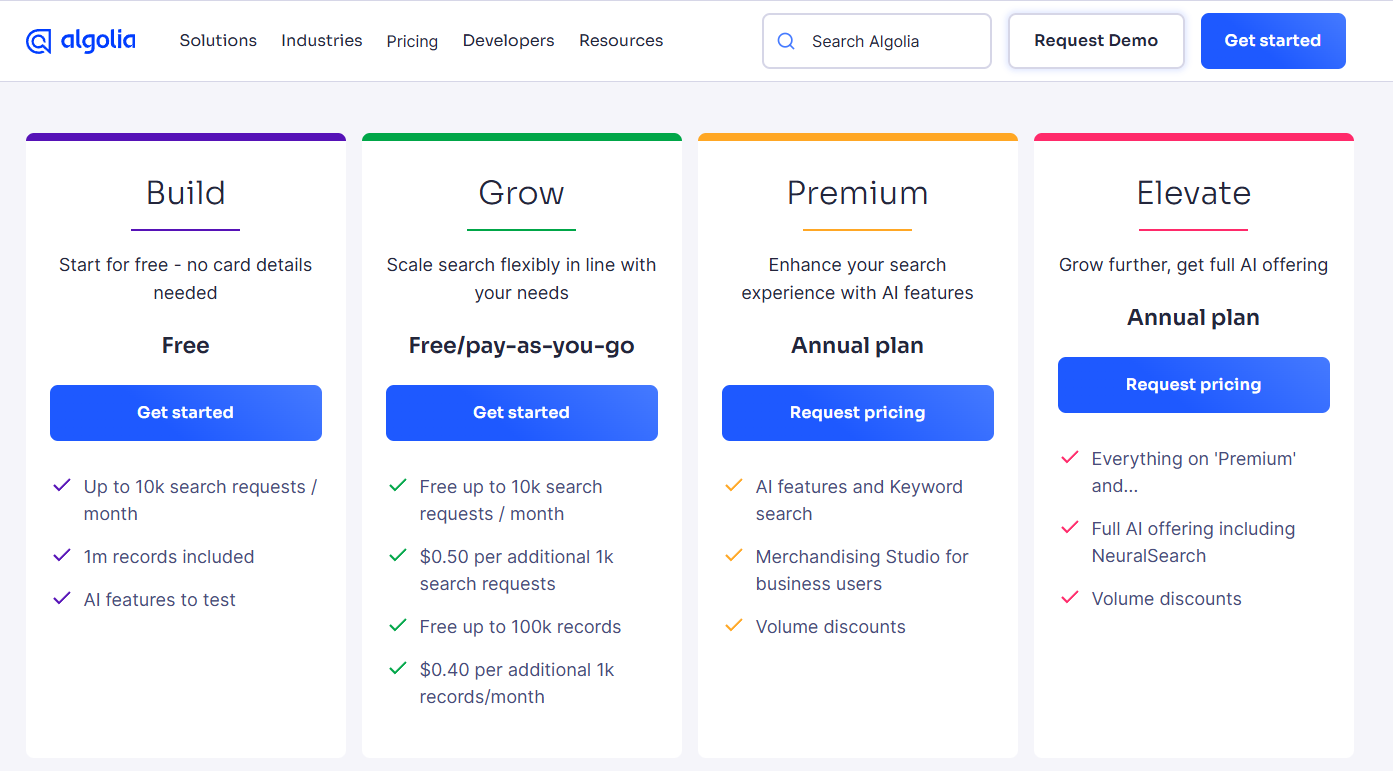
Algolia, a search-as-a-service platform, follows this model by combining pay-as-you-go pricing with dynamic scaling. Customers start with a base pricing tier, but as their query volume increases, pricing automatically adjusts to match usage. This approach makes it easier for startups and enterprises alike to scale search functionality without overpaying for unused capacity.
Best fit for: SaaS businesses with fluctuating demand or high competition. If your pricing varies based on usage or external factors, AI-driven pricing helps you stay competitive while optimizing revenue.
Not a fit for: Businesses where customers expect stable, predictable pricing. If your product is used in fixed workflows (like project management or collaboration tools), dynamic pricing might frustrate users.
17. Success-based pricing
Instead of charging a flat monthly fee, success-based pricing allows customers to pay only when they achieve results. This could be a percentage of revenue, a commission on transactions, or a fee tied to specific performance metrics. This model aligns a SaaS company’s pricing with the actual value it delivers to customers.
AppSumo, a marketplace for SaaS deals, follows this model by charging a commission only when a software company makes a sale. Rather than paying upfront fees to list their products, SaaS vendors only pay AppSumo a percentage of the revenue they generate from successful transactions. This approach minimizes risk and ensures that AppSumo’s success is directly tied to the success of its partners.

Best fit for: SaaS companies that facilitate transactions, lead generation, or measurable business outcomes. This model works well for marketplaces, sales and marketing tools, and performance-based platforms where revenue generation can be tracked.
Not a fit for: SaaS businesses where value is harder to quantify. If your product improves efficiency, collaboration, or experience without a clear dollar-value outcome, success-based pricing might limit revenue potential.
Competitive SaaS pricing strategies
SaaS subscription model pricing isn’t something you guess at or figure out overnight. After deciding which software billing models are right for what you offer, you have to be competitive in setting the prices themselves.
The best SaaS companies don’t just set a price and hope for the best—they tweak, test, and optimize until they hit the sweet spot. Here are some smart pricing strategies to help you bring in more revenue while keeping customers happy.
1. Charge based on value, not just costs
Instead of basing prices on what it costs to build and run your product, value-based pricing focuses on what customers are willing to pay. This means knowing exactly how your product saves them time, makes them money, or solves a major headache.
2. Use psychological pricing tricks
Customers don’t always think logically about pricing. Small tweaks can make a big difference in whether they sign up. For instance, charm pricing ($9.99 instead of $10) makes prices seem lower, while anchoring puts an expensive plan first, making lower-tier options feel like bargains. Bundling is another option where you combine features so customers feel like they’re getting more for their money.
3. Adjust pricing by region
If you’re selling globally, you can’t use the same price everywhere. People in different regions have different purchasing power and expectations. Localized pricing helps you stay competitive in every market.
4. Keep testing your pricing
Your first pricing model probably won’t be your last. The best SaaS companies are always testing new price points, different plan structures, and even small tweaks like trial length. A/B testing lets you see what actually drives sign-ups and reduces churn, And continual SaaS pricing comparison with your competitors will keep you in the game.
Regularly talk to customers and your sales team. Collect and categorize feedback so you can monitor how effective your pricing is. You can also use software like Price Intelligently to help you find gaps and opportunities.
Ready to build the perfect SaaS with the perfect pricing model? Learn now to hire an outside development team with experience building small MVPs.
Ready to build the perfect SaaS with the perfect pricing model? Learn how to hire an outside development team with experience building small MVPs.

Dayana Mayfield is a SaaS copywriter and content marketer specializing in SaaS marketing, positioning, and go-to-market strategy. She has consulted for over 195 SaaS companies, focusing on both traffic and conversions. She has been featured in Entrepreneur, Forbes, and Business Insider. Outside of work, Dayana writes SciFi novels and spends her evenings surviving auditions, rehearsals, and tech week as a proud theater mom.